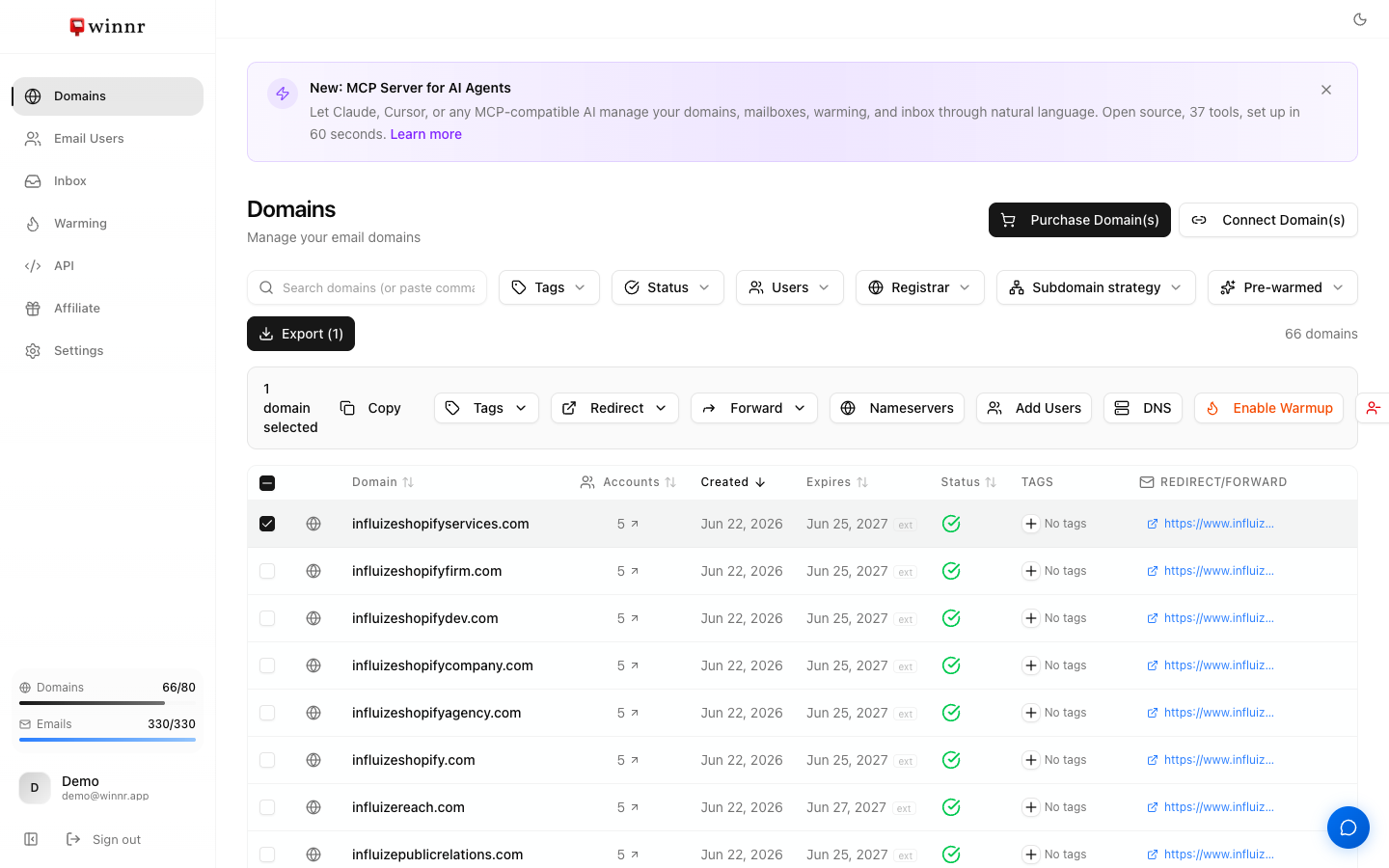
On the Domains page, check the boxes on the rows you want to change. A row of action buttons appears at the top. Available actions — add or remove tags, enable warming across all mailboxes on the selected domains, set redirect and forward URLs in one shot, and delete multiple domains at once (up to 100 per request). Everything is idempotent — running the same bulk action twice is a no-op.
When bulk is worth it
If you're managing more than 10 domains, bulk actions save real time. Common use cases:
- Onboarding a new client — buy 15 domains, bulk-tag them all with the client's code, bulk-enable warming.
- Retiring a campaign — filter by tag, bulk-delete the whole set (up to 100 per request).
- Rebranding — bulk-set a new redirect URL across all your domains at once.
Selection with filters
You can combine bulk actions with the filter row. Example:
- Filter by tag
client-acme→ only shows client-acme domains. - Click the header checkbox → selects every row that matches the filter.
- Click Add Tag
q3-launch→ adds it to only the client-acme rows.
This is how you scope a bulk action to a subset without hand-checking each row.
What's next
Step-by-step
-
1. Select domains
Check the box at the left of each row. Or use the header checkbox to select every row on the page (respects any active filter).
-
2. Use the action buttons
Once one or more rows are selected, a row of action buttons appears at the top of the page with a count of selected rows.
-
3. Pick the action
Available — Add Tag, Remove Tag, Enable Warmup, Redirect, Forward, Delete. (There's no bulk 'disable warming' — warming is turned off per mailbox.)
-
4. Confirm
Each action prompts a confirmation. For Delete, you confirm by typing the word DELETE, and a single request is capped at 100 domains.
-
5. Wait for the batch to finish
Bulk actions queue in the background. A progress toast shows completion. For big batches, plan for a few minutes total.
Frequently asked questions
How many domains can I bulk-edit at once?
For tag and warming actions you can select every row in the list. Bulk delete is capped at 100 domains per request — split larger cleanups into batches. Big deletes also take a few minutes because each mailbox teardown is sequential.
What happens if a bulk action fails on one row?
The rest still apply. The failed row shows an error in a summary toast at the end. Retry only the failed ones.
Can I bulk-change DNS provider?
Not currently — DNS provider is per-domain because each connect requires provider-specific credentials or manual DNS entry. Change one at a time.
Does bulk-enable warming charge me for every mailbox at once?
Yes — warming is $0.60/mailbox/month, and enabling warming on 100 mailboxes adds $60/month to your subscription. The bulk action shows the cost delta before you confirm.
Can I undo a bulk action?
Add/Remove Tag is reversible — run the opposite action. Redirect and Forward overwrite the previous values (no undo, but you can bulk-set them back). Delete is permanent — deleted domains and their mailboxes are backed up, so contact support if you need something restored.